Minified code turns a stack trace into t (app-JM4G42CY.js:2:1187). Upload your build's source maps with the BugDump CLI, and the same error reads renderCartSummary src/cart/cart-summary.ts:6, with the lines of code around it. The maps are stored privately: BugDump never serves them, and your site doesn't have to either.
You need the widget installed with error capture on (see Capturing JavaScript errors automatically), Node.js 18 or later in your build, and an owner or admin of the project to create a token.
How BugDump finds the right map
The CLI gives every built JavaScript file a debug ID, worked out from the file's content, and writes the same ID into its map. The widget sends the IDs of the files in an error's stack along with the error, and BugDump looks each map up by its ID.
Nothing depends on file names, URLs or release names, so a CDN, hashed file names or a rebuild that changes nothing all work without setup. Chunks your app loads lazily register their IDs when they load.
1. Create a release token
Open the project's Source maps page and click Create release token. Name it after where it will live, such as GitHub Actions, and copy it: it is shown once. Store it as a secret in your CI under BUGDUMP_RELEASE_TOKEN.
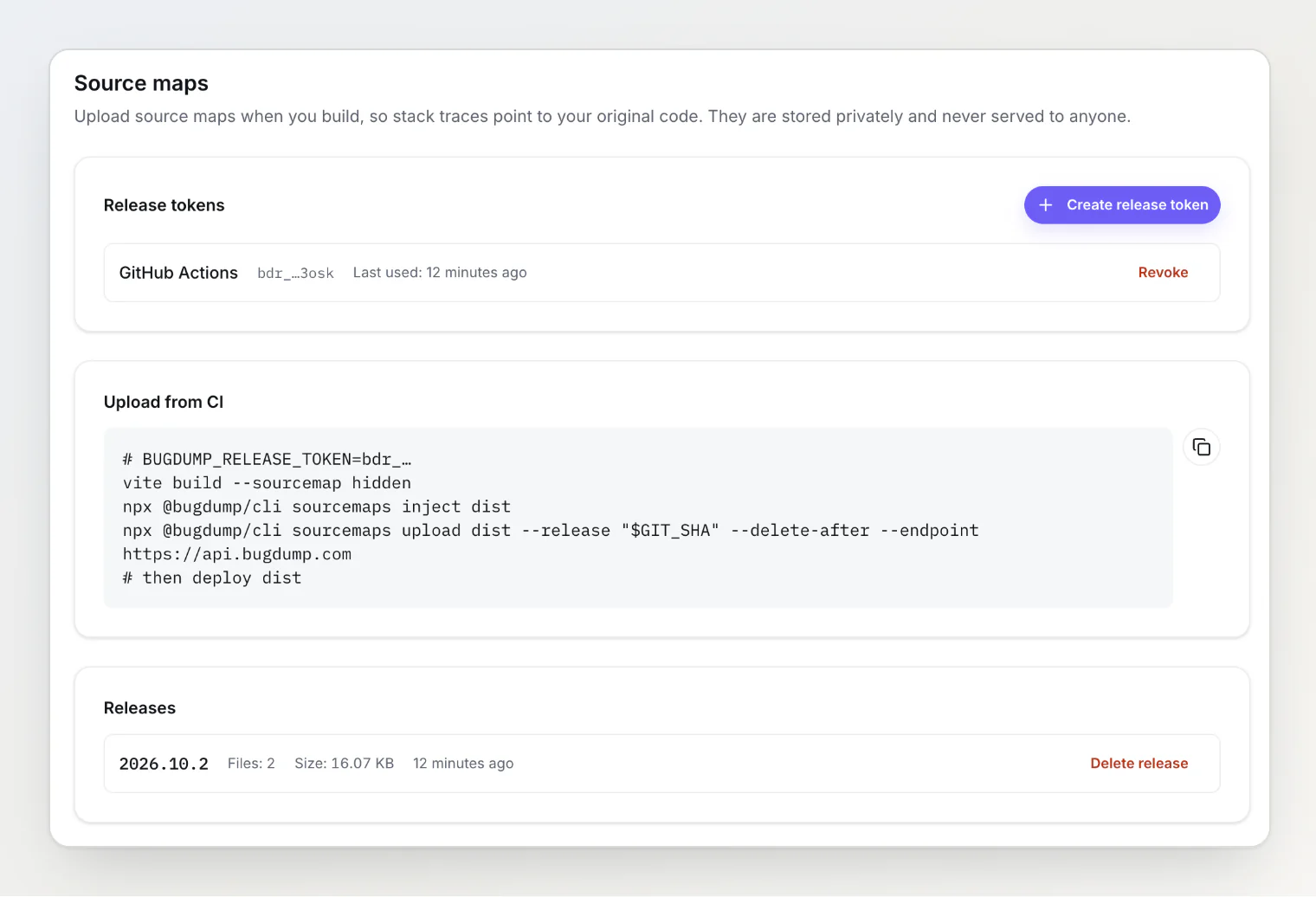
A release token can only upload source maps to its project. It can't read errors or reports, and it isn't a widget key or an MCP token. A project holds up to 10, and the list shows when each was last used. Revoke one the moment it might have leaked; builds using it start failing, nothing else changes.
2. Build with hidden source maps
"Hidden" means the bundler writes the .map files but doesn't reference them from your JavaScript, so browsers never ask for them.
Bundler | Setting |
|---|---|
Vite |
|
webpack |
|
Rollup |
|
esbuild |
|
Any bundler that writes a .map next to each file, or names it in a //# sourceMappingURL= comment, works.
3. Inject and upload
Install the CLI as a dev dependency, or run it with npx and skip the install:
npm install --save-dev @bugdump/cliThen, after the build and before the deploy:
npx @bugdump/cli sourcemaps inject dist
npx @bugdump/cli sourcemaps upload dist --release "$GIT_SHA" --delete-after
inject adds a one-line snippet to the top of each JavaScript file that has a map, appends a //# debugId= comment, and writes the ID into the map, shifting it by the added line so line numbers still match. It needs no token and makes no request, and running it twice changes nothing.
upload sends every map under the folder that has a debug ID. Maps BugDump already has are skipped.
--delete-afterremoves the maps from the folder once BugDump has confirmed them, so they never reach your server.--releasetags the maps with a release, such as the commit. It is optional: maps are found by debug ID, never by release. BugDump shows the release next to each error and uses it to decide when a fixed error has come back (see Working with captured errors).--endpointis only for a self-hosted API; the default ishttps://api.bugdump.com.
4. Deploy the injected files
Deploy the output as it is after inject. If you deploy a copy from before it, the files carry no debug IDs and their stack traces stay minified.
A GitHub Actions example
- run: npm ci
- run: npx vite build --sourcemap hidden
  env:
    VITE_GIT_SHA: ${{ github.sha }}
- run: npx @bugdump/cli sourcemaps inject dist
- run: npx @bugdump/cli sourcemaps upload dist --release "${{ github.sha }}" --delete-after
  env:
    BUGDUMP_RELEASE_TOKEN: ${{ secrets.BUGDUMP_RELEASE_TOKEN }}
# deploy dist here
Pass the same commit to the widget, so every error carries it: release: import.meta.env.VITE_GIT_SHA in Bugdump.init(), or data-release on the script tag.
What changes on the error page
Every frame BugDump could map shows your function, file and line, and Show source context opens the lines around it. Show minified code switches back to what the browser reported, which helps when a map is wrong or missing.
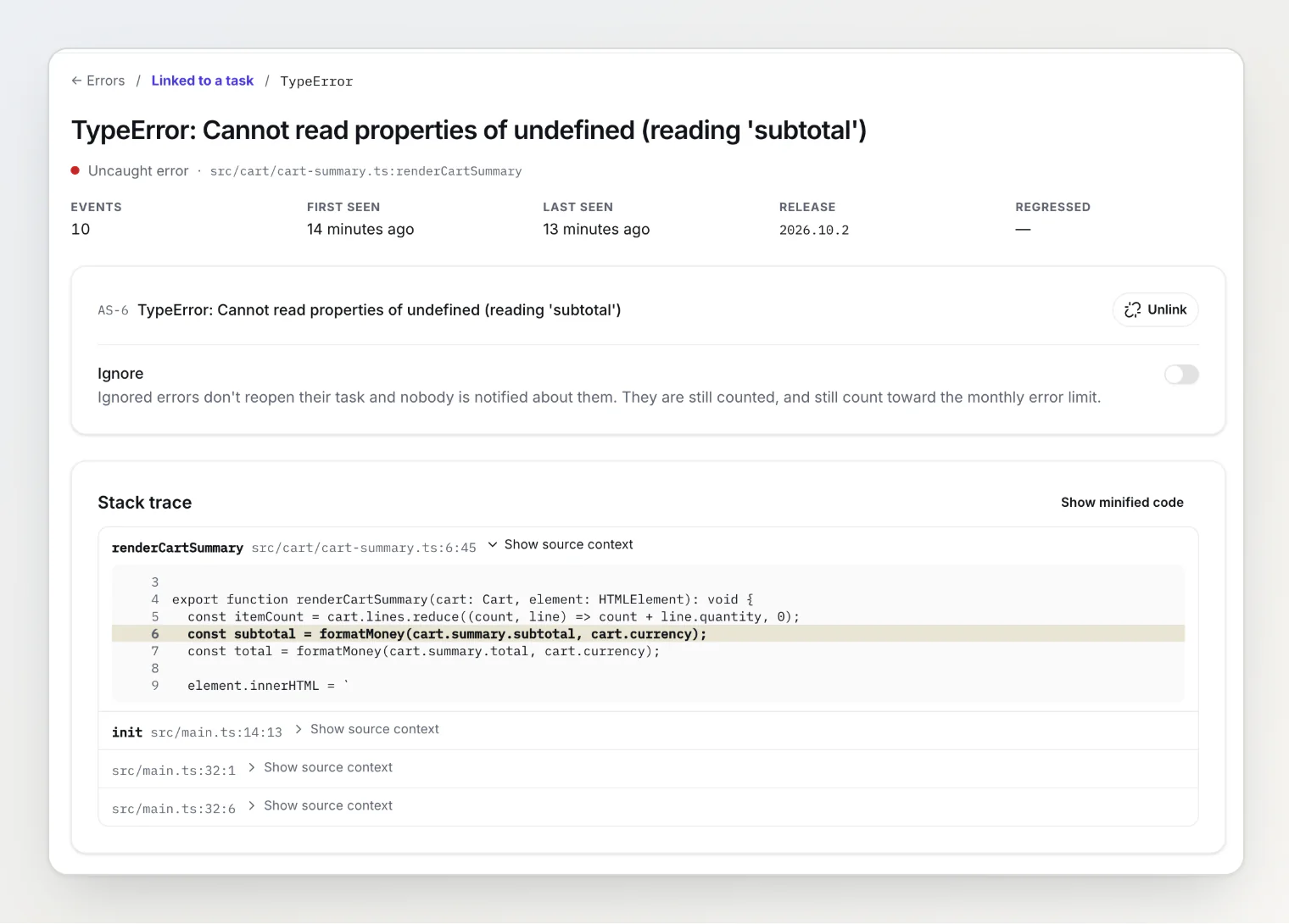
Mapping also makes grouping steadier: frames your maps resolve are compared by original file and function, which stay the same from one build to the next.
Storage and limits
One map can be up to 20 MB. A larger one is skipped with a warning.
Source map storage per project is 100 MB and 2,000 files on Free, 1 GB and 20,000 on Pro, 5 GB and 100,000 on Ultra. At the limit, uploads fail and the maps you already have keep working.
A map that no error has used for 90 days is deleted.
The Releases list on the Source maps page shows what each release holds. Delete release removes its maps; errors already mapped keep their readable stack traces.
Troubleshooting
Frames are still minified. In order of likelihood: the deployed files are from before inject; the upload failed or never ran (check the Releases list); the map was over 20 MB; or the frame comes from a script you didn't build, such as a third-party tag. Frames BugDump couldn't map stay as the browser reported them.
upload says no map has a debug ID. Run inject on the same folder first.
upload is refused. The token was revoked or mistyped. Create a new one on the Source maps page.
A request failed. The CLI retries a 429 or a server error three times. If it still fails, it exits with a non-zero code and deletes nothing, so it is safe to run again.