The widget ships in six languages: English, Russian, Spanish, French, Portuguese (Brazilian) and German. It picks one on its own, and you can still replace any string in it with your own words.
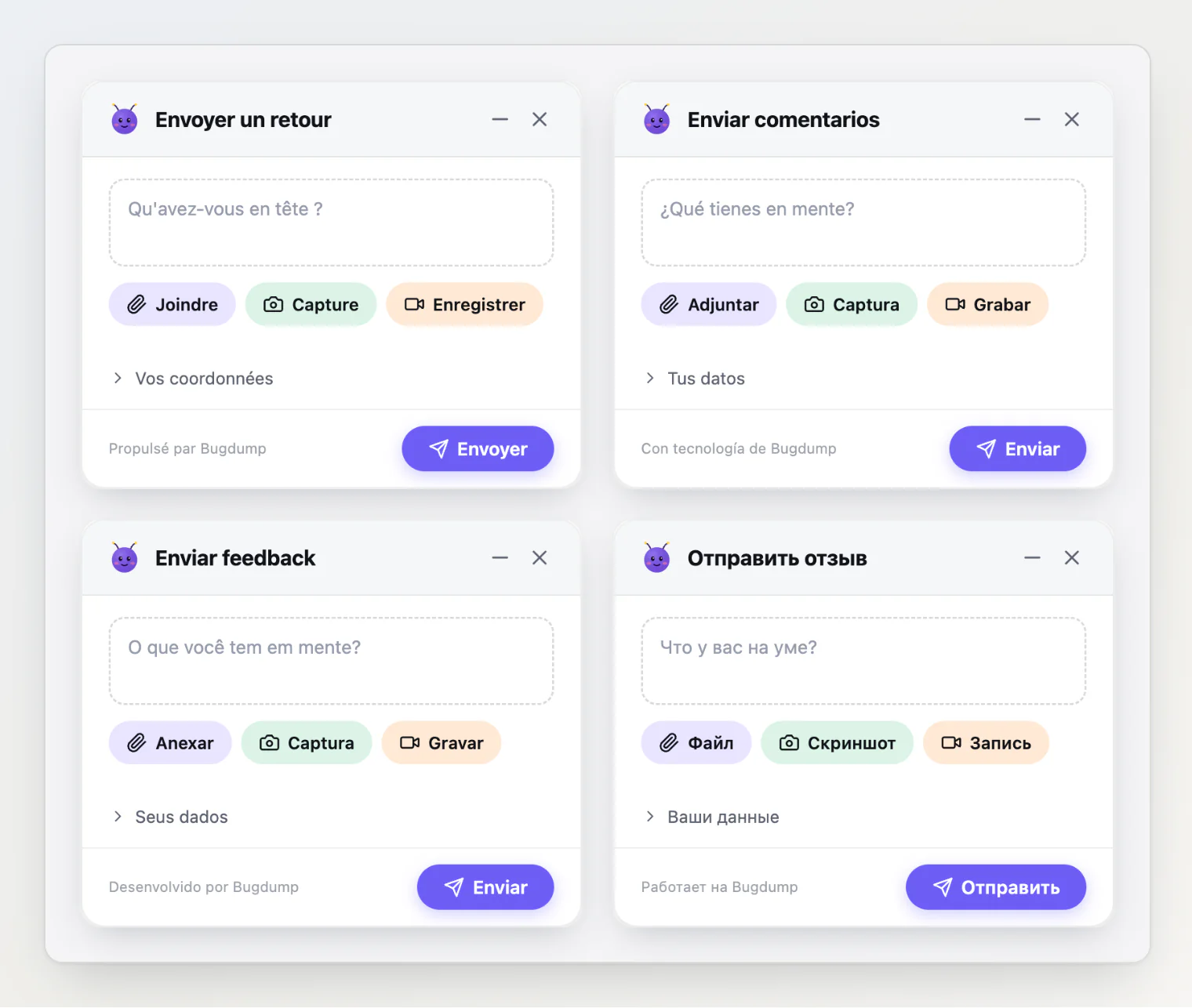
Which language the widget uses
With no configuration, the widget uses the first language it ships in from this list:
The page's own language, from
<html lang="…">.The visitor's browser languages, in their order of preference.
English.
Only the language part of a tag counts, so fr and fr-CA both get French, de-AT gets German, and pt-PT gets the Brazilian Portuguese strings. A page that declares <html lang="en"> keeps the widget in English even for a visitor whose browser prefers Spanish. That is usually what you want: the widget matches the page around it.
To choose the language yourself, pass locale:
Bugdump.init({
  apiKey: 'your-api-key',
  locale: 'fr', // 'auto' (the default), 'en', 'ru', 'es', 'fr', 'pt', 'de', or any language tag
});
From a script tag, use data-locale:
<script
  src="https://bugdump.com/sdk/latest.js"
  async
  data-api-key="your-api-key"
  data-locale="fr"
></script>
locale: 'en' keeps the widget in English everywhere, the way it behaved before SDK 0.0.41.
From the Widget page
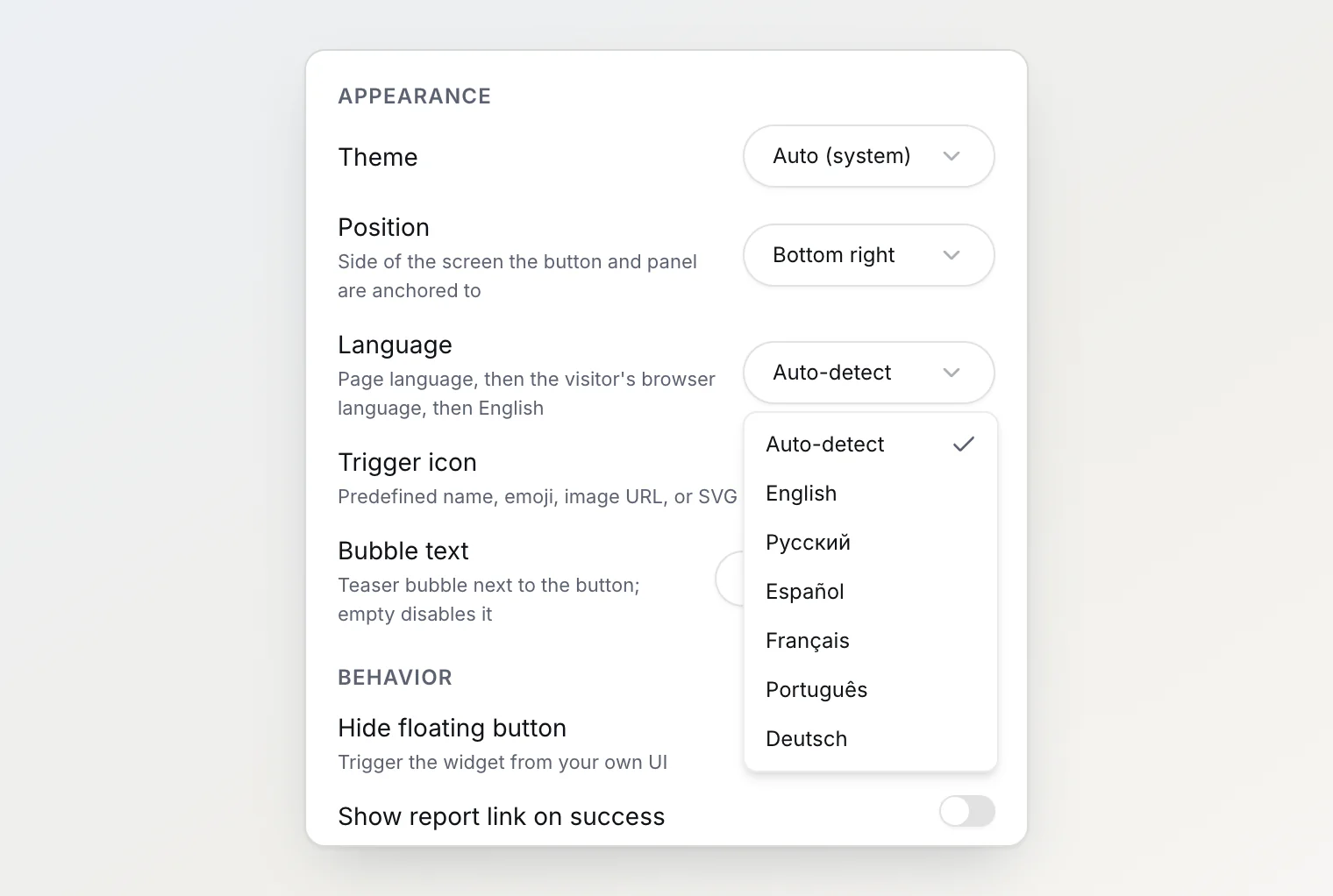
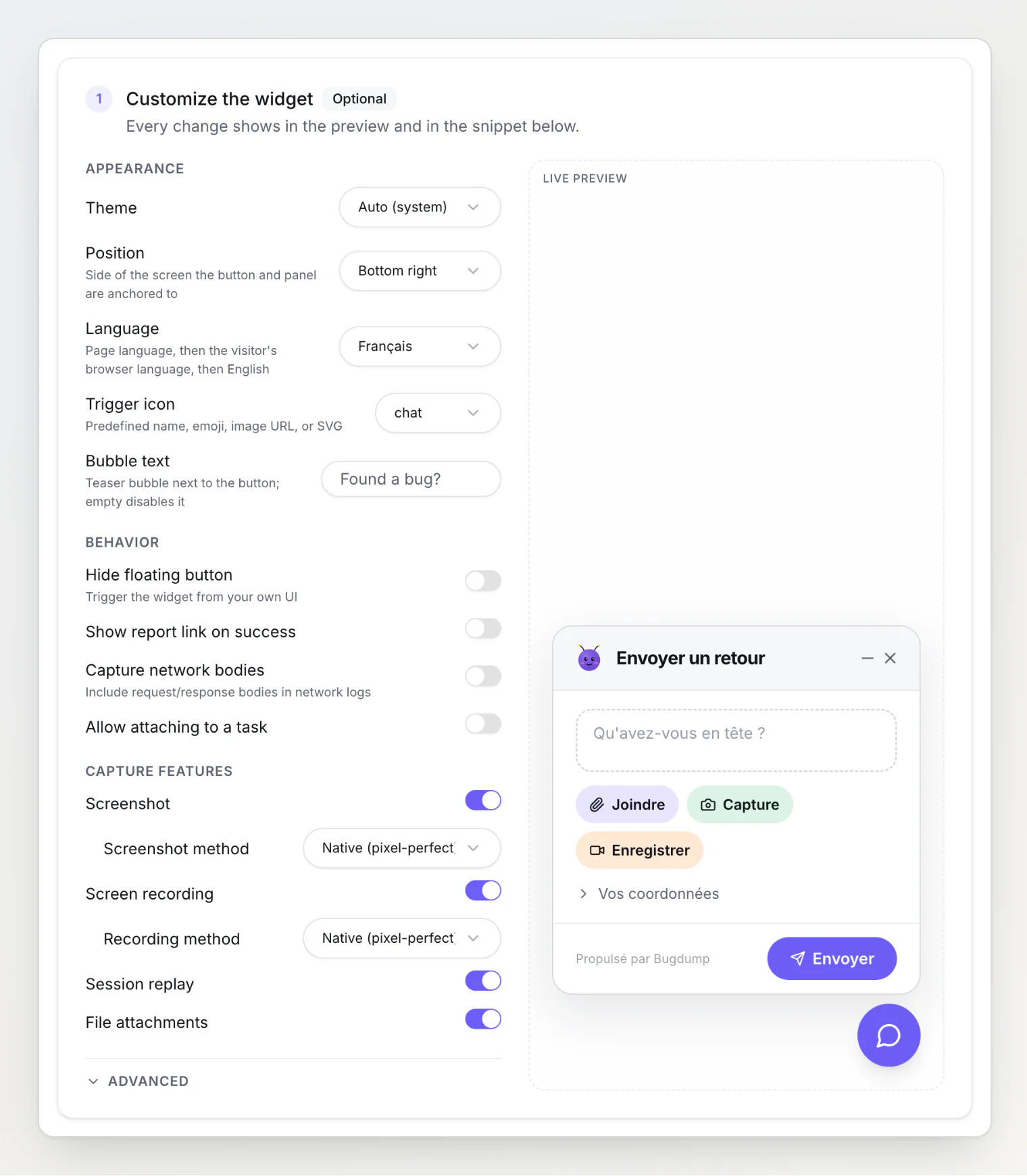
The Language setting in step 1 of the project's Widget page does the same without code. Leave it on Auto-detect for the rules above, or pick a language.
The live preview switches to the language you picked, and the snippet in step 2 gains a data-locale attribute. Copy the snippet again after changing it: the setting lives in your embed code, not on our servers.
Checking what was picked
On a live page, run this in the browser console:
Bugdump.getInstance()?.getConfig()?.locale; // 'fr'The widget also sets the language as the lang attribute of its <bugdump-widget> element, so a screen reader reads a French panel with a French voice even on an English page.
Changing individual strings
translations replaces any string, on top of whichever language was picked. Pass only the keys you want to change:
Bugdump.init({
  apiKey: 'your-api-key',
  translations: {
    title: 'Report a problem',
    descriptionPlaceholder: 'What went wrong?',
    successTitle: 'Thank you!',
  },
});
From a script tag, pass the same object as JSON in data-translations.
German: Sie or du
The German strings address the visitor formally, with Sie, which reads right on any site. If your site says du, replace the eight strings that address the visitor. Set locale: 'de' as well: translations applies on top of whichever language was picked, so without it a visitor who gets English would see these German strings.
Bugdump.init({
  apiKey: 'your-api-key',
  locale: 'de',
  translations: {
    descriptionPlaceholder: 'Was möchtest du uns mitteilen?',
    reporterToggle: 'Deine Kontaktdaten',
    namePlaceholder: 'Dein Name',
    emailPlaceholder: 'Deine E-Mail',
    successSubtitle: 'Vielen Dank für dein Feedback.',
    errorMessage: 'Etwas ist schiefgelaufen. Bitte versuche es erneut.',
    emptyDescriptionMessage: 'Bitte beschreibe vor dem Senden, was passiert ist.',
    quotaExceededMessage: 'Diese Website nimmt gerade kein Feedback an. Bitte versuche es später erneut.',
  },
});
Every translatable key
The defaults below are the English strings. Each built-in language has its own.
Panel and trigger
Key | Default |
|---|---|
| Send feedback |
| falls back to |
| What's on your mind? |
| Minimize |
| Close |
minimizePanel and closePanel name the two icon buttons in the panel header for screen readers.
triggerTitle is the only key with a fallback: leave it out and it follows title, so overriding title alone changes both the panel header and the button tooltip. Set it explicitly only when you want them to differ.
Buttons
Key | Default |
|---|---|
| Attach |
| Screenshot |
| Record |
| Send |
| Close |
| Submit another |
closeButton and submitAnother are the two buttons on the success screen.
Reporter fields
Key | Default |
|---|---|
| Reporter info |
| Your name |
| Your email |
Task attachment (shown when allowTaskAttach is enabled)
Key | Default |
|---|---|
| Attach to task |
| Task ID |
States and messages
Key | Default |
|---|---|
| Capturing... |
| Record |
| Stop |
| Sending... |
| Feedback sent! |
| Thank you for your feedback. |
| Uploading |
| Something went wrong. Please try again. |
| Please describe what happened before sending. |
| This site is not accepting feedback right now. Please try again later. |
While attachments upload, the send button reads uploading followed by the file count and progress, as in "Uploading 1/3… 40%". Translate only the word.
quotaExceededMessage is shown in the panel, with Send disabled, while the project is not accepting reports — when it has used its monthly reports, or a Free project has reached its task limit. It needs SDK 0.0.43 or later.
Recording bar
Key | Default |
|---|---|
| Toggle microphone |
| Select microphone |
| Microphone |
microphone names a microphone the browser reports without a label; the widget adds its number, as in "Microphone 2".
Annotation tools and editor
Key | Default |
|---|---|
| Arrow |
| Rectangle |
| Draw |
| Text |
| Blur |
| Undo |
| Cancel |
| Done |
| Type text… |
| Red |
| Yellow |
| Green |
| Blue |
| White |
The five color keys are the tooltips and screen-reader names of the color swatches.
Attachment badges
Key | Default |
|---|---|
| Screenshot |
| Recording |
| Replay |
| Voice note |
Report link (shown when showReportLink is enabled)
Key | Default |
|---|---|
| Copy link |
| Copied! |
Footer and labels
Key | Default |
|---|---|
| Powered by |
| View reports |
| Remove |
| Dismiss |
The widget adds "Bugdump" after poweredBy. viewReports is the footer link shown when your project's public portal is on. removeAttachment and dismissBubble are screen-reader names for the attachment's remove button and the teaser bubble's close button.
A language the widget doesn't ship
For any other language, set locale to its code and pass the strings yourself. Anything you leave out falls back to English, and the widget still declares the language you set.
Bugdump.init({
  apiKey: 'your-api-key',
  locale: 'nl',
  translations: {
    title: 'Feedback versturen',
    descriptionPlaceholder: 'Wat is er gebeurd?',
    attachButton: 'Bijvoegen',
    screenshotButton: 'Screenshot',
    recordButton: 'Opnemen',
    sendButton: 'Versturen',
    sending: 'Versturen...',
    successTitle: 'Feedback verstuurd!',
    successSubtitle: 'Bedankt voor je feedback.',
    errorMessage: 'Er ging iets mis. Probeer het opnieuw.',
    closeButton: 'Sluiten',
    undo: 'Ongedaan maken',
    cancel: 'Annuleren',
    done: 'Klaar',
  },
});
When translating fully, do not stop at the panel — the annotation editor (undo, cancel, done) and the attachment badges are visible to anyone who takes a screenshot, and leaving them in English is the most commonly missed half of a translation.
Keep labels short. Action buttons share one row, and the badges on attachments are 72 pixels wide: a long word wraps onto a second row or ends in an ellipsis.
If many of your visitors speak a language we don't ship yet, tell us at admin@bugdump.com. Adding one to the SDK is a small change.
Switching language at runtime
The language is read once, at init. To change it when the user switches language in your app, tear the widget down and initialize it again:
function setWidgetLanguage(locale: string) {
  bugdump?.destroy();
  bugdump = Bugdump.init({
    apiKey: 'your-api-key',
    locale,
  });
}
Re-run identify() and setContext() afterwards, since the new instance starts without them. The console logs and network requests collected so far are discarded too, so do this when the language actually changes, not on every render.
With @bugdump/react, change the provider's locale instead. The provider restarts the widget, and effects that list the hook's value in their dependencies set the user and context again.
Matching your product's voice
Translation is not the only reason to override strings. The defaults are neutral; your product may not be.
The default title is "Send feedback", which is broader than "Report a bug" — worth changing if you want bug reports specifically, since the wording shapes what people send.
descriptionPlaceholder does real work here. "What's on your mind?" invites anything. "What did you expect to happen, and what happened instead?" prompts a genuinely more useful report, and costs one line.
Visual customization
Theme. theme: 'light' | 'dark' | 'auto'. auto follows the user's OS preference. When your app has its own light/dark toggle, pass its current theme at init and call setTheme() whenever it changes — see Matching the widget to your app's theme.
Icon. icon replaces the trigger button's default icon.
Teaser bubble. bubbleText shows a dismissible prompt beside the button:
Bugdump.init({
  apiKey: 'your-api-key',
  bubbleText: 'Found a bug?',
});
Dismissal is remembered in localStorage. Ignored when hideButton is set.
The widget renders inside a closed Shadow DOM, so your CSS cannot reach it — customization goes through these options rather than stylesheets.
Removing BugDump branding
Available on Pro and Ultra. Once enabled, the widget carries no BugDump attribution — appropriate for white-labelled products or client work.
This is applied server-side from your plan, not set in the SDK config: the widget receives it when it initializes.
The free plan shows a small BugDump mark.
Your own trigger entirely
For complete control over presentation, hide the button and drive the widget from your own UI:
const bugdump = Bugdump.init({
  apiKey: 'your-api-key',
  hideButton: true,
});

document.querySelector('#report-bug').addEventListener('click', () => {
  bugdump.open();
});
The panel still uses the widget's own styling, but the entry point is entirely yours.
See also
Widget configuration reference
SDK API reference