If the people who report bugs are clients or customers who won't install anything, you want a widget on the site: Marker.io, BugHerd, Userback, Usersnap, Ybug, Feedbucket or BugDump. If they're your own team, Jam's browser extension works on any site with no setup on it. Then the question is which plan puts the console, the network requests and a session replay into each report: Jam and BugDump include them on every plan, two tools put them on a higher plan, and four don't list all three on any plan.
BugDump is mine, so read its part with that in mind. I checked every price below on the vendor's own pricing page on 18 November 2026.
The tools side by side
Tool | Cheapest paid plan, billed monthly / yearly | People in it | Free plan or trial | How reports come in | Console, network, replay |
|---|---|---|---|---|---|
Marker.io | $59 / $39 a month | 3, then $6 / $4 each | 15-day trial | Widget and extension | From Team, $199 / $149 |
BugHerd | $50 / $42 a month | 5, then $8 / $6.60 each | 7-day trial | Script tag, extension as a fallback | Not on the pricing page |
Jam | $14 per creator a month, billed yearly | Per creator | Free: 30 Jams a month | Extension, Mac and iOS apps, recording links | On every plan |
Userback | $49 / $39 a month | 5 | Free: 2 seats, feedback visible 7 days | Widget and extension | From Business, $119 / $89 |
Usersnap | €49 / €39 a month | 2 | Trial | Widget and extension | JavaScript and network errors only |
Ybug | €13 / €10 a month | 3 | Free: 1 project, 1 member | Widget, extension from Basic | Limited console on Basic, network from Startup (€29 / €23), no replay |
Feedbucket | $49 / $39 a month | 2 | 14-day trial | Widget | Console logs; no network or replay |
BugDump | $4.99 a month | 10 per project | Free: 3 projects, 3 members each | Widget | On every plan, Free included |
Yearly prices are per month, billed for the year. BugDump has no yearly price, and its prices exclude tax.
Who sends the reports
A widget is a button the site loads with a script tag. The person reporting clicks it, types what happened and sends, with no account and nothing to install. That suits a client who reviews a site once a month or a customer who hit a bug at checkout. Marker.io says it plainly: "Clients and end-users can send feedback without an account or a paid seat."
An extension is the better tool for your own team. It works on any site, including ones where you can't add a script. Jam is built around it and has no widget. Its recording links let someone without the extension record their screen, but by default they capture only the screen recording. For console and network data, Jam's docs ask you to connect your domain and install its scripts.
What the developer gets in each report
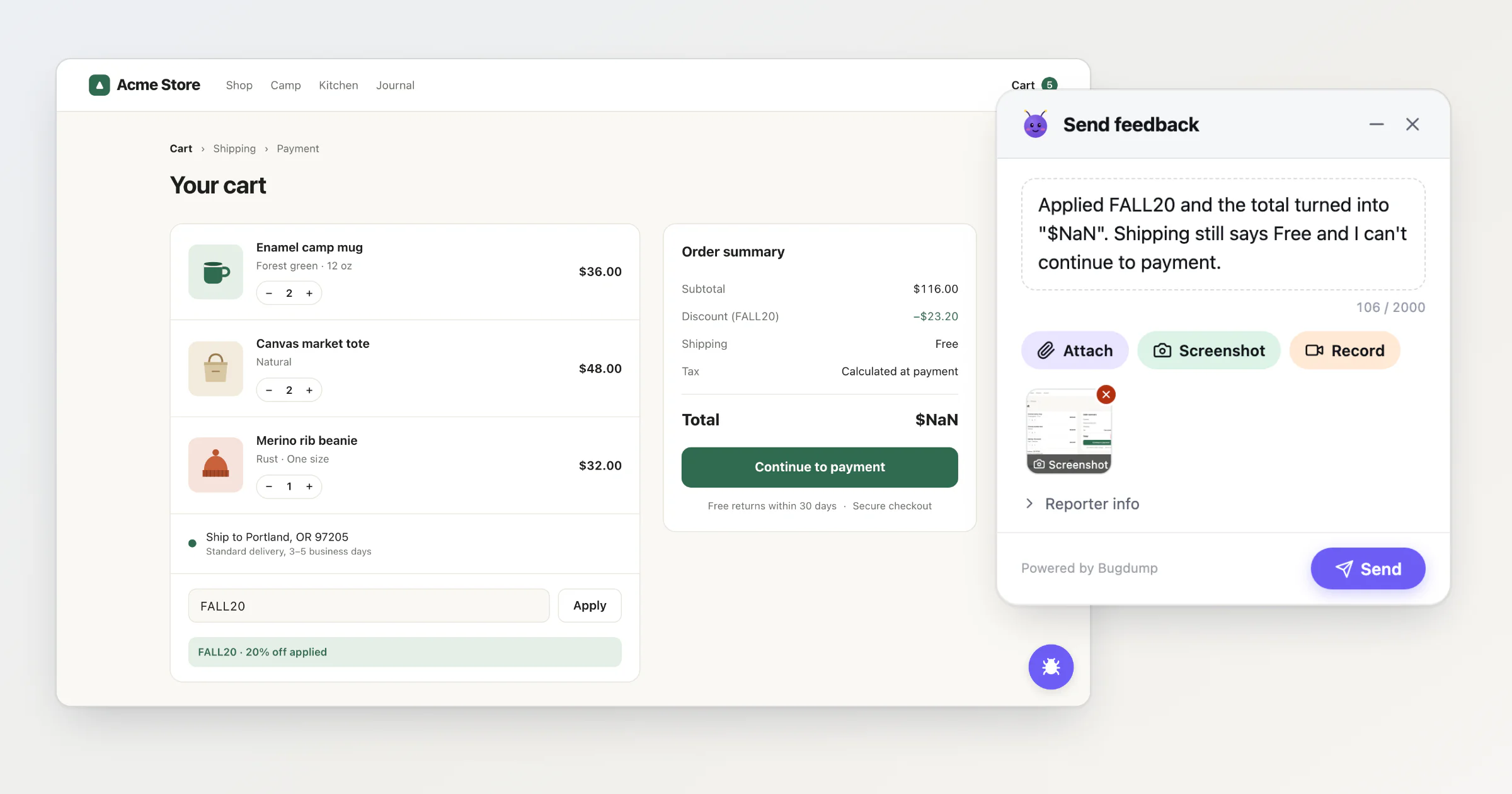
Here is a report from a demo shop I use for screenshots, with a made-up customer. Maya applied the code FALL20 and wrote that the total turned into $NaN. Her screenshot shows exactly that, and nothing about why. The rest of her report holds the why: GET /api/shipping/rates answered 503 in 1,204 ms with carrier_timeout, the console logged "[checkout] blocked: total is not a number", and the action list shows her steps: the + on a tote bag, typed "FALL20", the coupon form submitted.
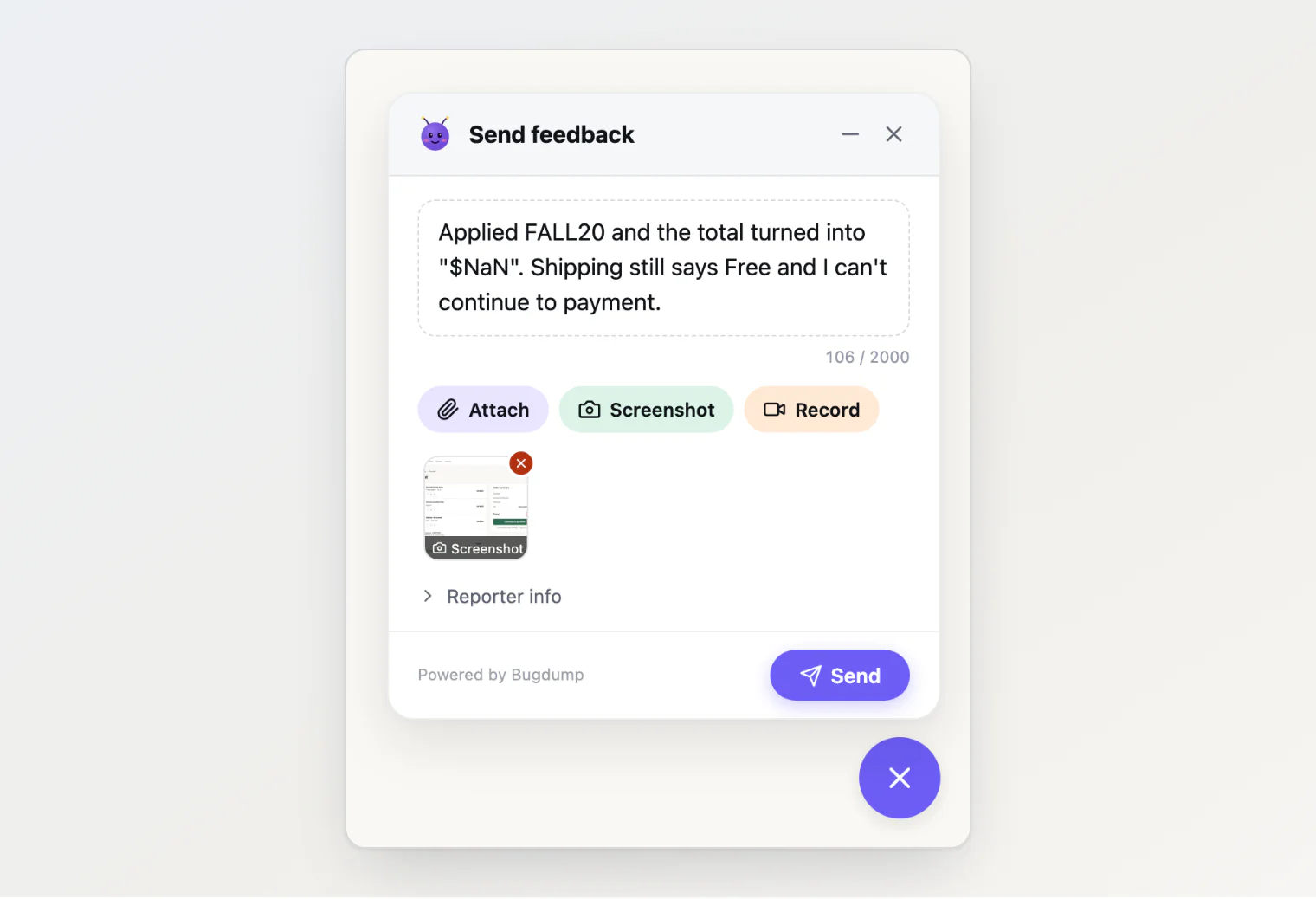
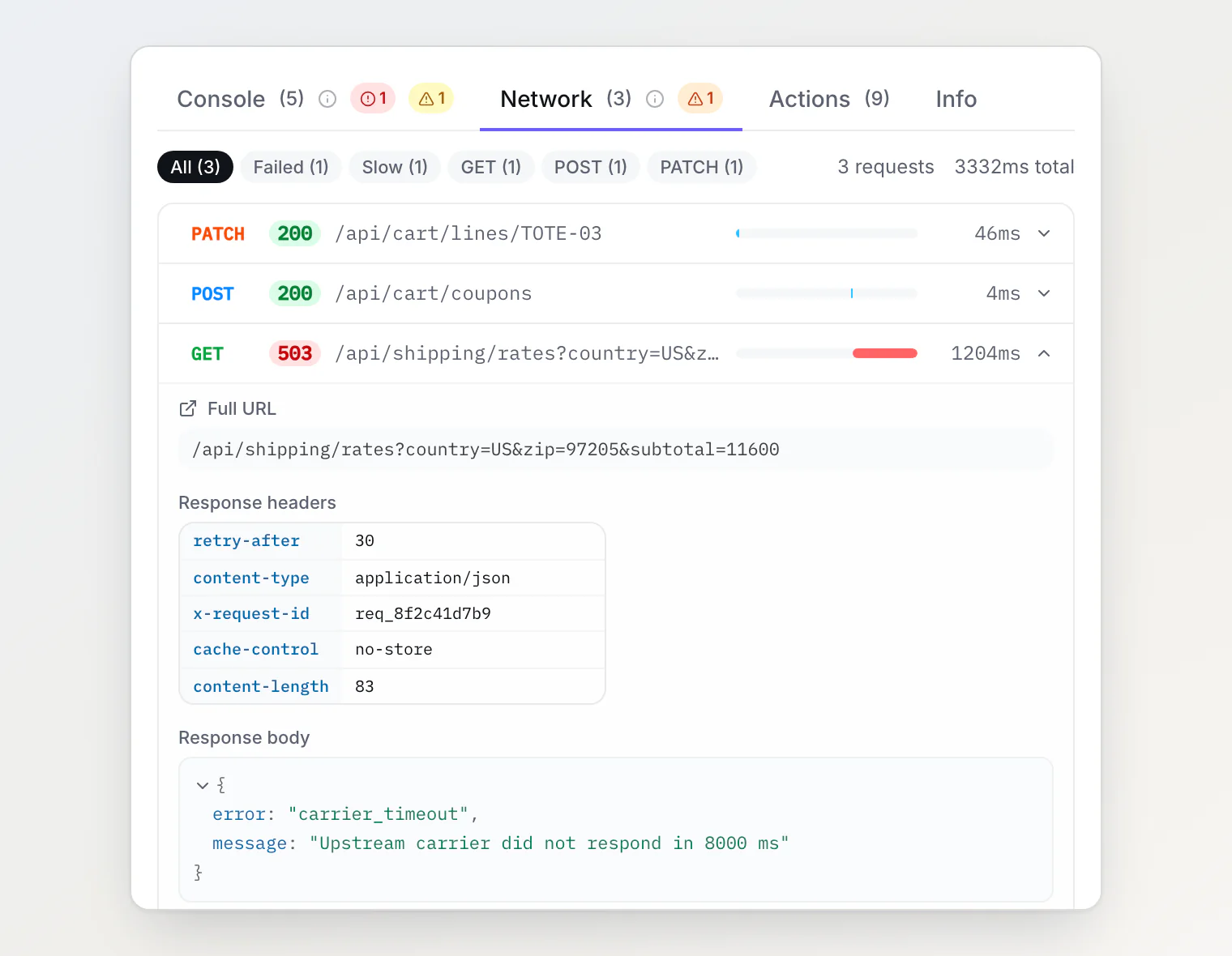
That's the part the tools differ on most. Jam and BugDump include the console, the network and a replay on every plan. Jam has Instant Replay, a rolling two-minute buffer you turn on in the extension. BugDump adds the clicks and typing before the report and keeps the last three minutes of session replay.
Marker.io adds them from Team at $199 a month ($149 yearly), and Userback from Business at $119 ($89 yearly). Ybug has a limited console on Basic and adds network capture from Startup at €29 (€23 yearly). Usersnap captures JavaScript and network errors on all plans, with no replay on its pricing page.
BugHerd's pricing page lists screenshots, technical metadata such as the browser and screen size, and video. It says nothing about console logs, network requests or replay. Feedbucket lists console logs, on Pro in its comparison table and on Business in its plan cards.
How the price grows
Most of these tools price by seat. For eight people, billed yearly, Marker.io Starter costs $39 + 5 × $4 = $59 a month, BugHerd Standard $42 + 3 × $6.60 = $61.80, and Jam Team 8 × $14 = $112. Userback's Team includes five seats, Usersnap's and Feedbucket's cheapest plans two.
BugDump prices by the project owner. Pro is $4.99 a month for up to 20 projects with up to 10 members each, and 10,000 reports a month per project. Past 10 members on a project or 20 projects, Ultra costs $9.99 a month for up to 100 of each. In Marker.io, BugHerd's public widget and BugDump, people who report through the widget need no seat.
Each tool in a few lines
Marker.io integrates with Trello, Asana, ClickUp, GitHub, GitLab, Linear and Notion from Starter, and with Jira from Team. Its replay covers up to the last 2.5 minutes per its help center, and three minutes per its feature page. It fits a team on Linear, GitLab or Notion, which BugDump doesn't integrate with, and a team that pays for Team to get the console, network and replay.
BugHerd puts a script tag on the site, with an extension as a fallback, and has a public widget for visitors who aren't invited. Standard includes five members and Trello, Slack, GitHub and 12 more integrations. Jira, Linear and Asana need Premium at $150 a month ($125 yearly). The pricing page offers a 60-day money-back guarantee.
Jam fits your own team: engineers, QA, product people. Free covers 30 Jams a month for up to five creators. It integrates with Jira, Linear, GitHub, GitLab, Slack, Asana, ClickUp, Notion and Sentry.
Userback puts the widget and the extension on every plan, and its MCP server comes with Team.
Usersnap has the widget and the extension, and syncs both ways with Jira, Azure DevOps, Linear and others on every plan. If you need an issue's status to come back from Jira or Linear, Usersnap fits better: BugDump sends a task once. Its trial adds a free month of Premium once you set up two channels and collect 20 feedback items.
Ybug costs the least among the tools that price by seat: €10 a month, billed yearly, for three people on Basic. Its Free plan covers 50 screenshots a month, with no extension and no integrations.
Feedbucket is a widget only, installed with one line of JavaScript or a WordPress plugin, with Jira, GitHub, Linear, GitLab, Slack, Asana and ClickUp on every plan. It fits a team on Linear or GitLab, which BugDump doesn't support.
BugDump is a widget you add with a script tag, an npm package or a React package. Every report comes with the console, network, actions and the last three minutes of session replay, on Free too, plus any screenshot or recording the reporter adds. Free covers three projects, three members each and 500 reports a month per project, and keeps reports for 30 days. Pro, at $4.99 a month, adds integrations (Slack, Jira, GitHub Issues, Asana, Telegram, Discord, Freshdesk and GitHub Actions) and webhooks, and keeps reports for 90 days.
Where BugDump falls short:
It has no browser extension, so it can't report on a site where you can't add the script.
It has no Linear, GitLab or Notion integration.
An integration sends a task once. Nothing comes back: closing the Jira issue doesn't close the task.
It has no native mobile SDK. It works in web pages on phones.
It's in beta.
Every tool has an MCP server now
Through an MCP server, an AI assistant such as Claude or Cursor reads the reports. All eight tools in the table have one: Marker.io, Jam, Usersnap and Feedbucket on every plan, BugHerd's in beta, Userback's from Team, Ybug's read-only on Basic, and BugDump's on every plan, Free included. From Maya's screenshot alone, an agent sees $NaN. Her full report also hands it the 503 from /api/shipping/rates that left the shipping rate empty.
If you already use Sentry
Sentry's User Feedback widget is included in its free Developer plan, which is for one user. With Session Replay set up, it attaches the 30 to 60 seconds before the report (Sentry's docs give both figures), and the free plan includes 50 replays. If your team already works in Sentry, try it before you add another tool.
Questions about bug reporting tools
Is there a free bug reporting tool for websites? Yes. BugDump Free and Jam Free both have the console, network and replay: BugDump through the widget, with 500 reports a month per project, and Jam through the extension, with 30 Jams a month. Userback Free keeps feedback for seven days, Ybug Free covers one project and one member, and Sentry's User Feedback comes with its free plan.
Do clients need an account to report a bug? Not with a widget. With an extension, each person installs it, and Marker.io's extension needs a Marker.io account. Jam's recording links need neither, but by default they capture only the screen.
Which tools include session replay? Jam and BugDump on every plan, Marker.io from Team, Userback from Business, and Sentry with Session Replay set up.
Continue reading
How to Add a Bug Report Button to Your Website: the three ways to put a widget on a site, and the settings to choose first.
Collecting Website Bug Reports From Clients: A Setup for Agencies: one script per client site, and clients who need no account.
Lightweight Bug Tracking for Small Teams: When Jira Is Too Much: what a small team needs from the tracker the reports land in.