A HAR file is a JSON recording of every request the browser made while its developer tools were open: URLs, headers, cookies, request and response bodies, and timings. To make one, open the developer tools on the Network tab, turn on the option that keeps the log across page loads, repeat what went wrong, and export.
Chrome and Edge
Open the page with the problem.
Press F12, or Cmd+Option+I on a Mac, and select the Network tab.
Check Preserve log, so the list survives reloads and redirects.
Reload the page and repeat what went wrong.
Click Export HAR (sanitized)... in the bar at the top of the Network panel, and save the file.
Chrome exports the sanitized file by default. It leaves out the Cookie, Set-Cookie and Authorization headers. If a support team asks for those, turn on Allow to generate HAR with sensitive data in Settings → Preferences → Network, then pick Export HAR (with sensitive data) from the export menu.
Edge uses the same labels, according to Microsoft. Its settings open from the "…" menu, Customize and control DevTools, at the top right of the developer tools.
Firefox
Open the page with the problem.
Press F12, or Cmd+Option+I on a Mac, and select Network.
Open the menu with the gear icon at the top right of the panel and check Persist Logs.
Reload the page and repeat what went wrong.
In the same menu, choose Save All As HAR.
I haven't found a sanitized export in Firefox's menu, so treat the file as if it holds your cookies.
Safari
Turn on the developer menu: Safari → Settings → Advanced → Show features for web developers.
Open the page, choose Develop → Show Web Inspector (Cmd+Option+I), and select the Network tab.
Turn on Preserve Log.
Reload the page and repeat what went wrong.
Click Export, or press Cmd+S, and save the file.
On an iPhone, turn on Settings → Safari → Advanced → Web Inspector, connect the phone to a Mac, and inspect the page from Safari's Develop menu on the Mac. For Chrome on Android, turn on USB debugging and open chrome://inspect in Chrome on a computer.
What a HAR file holds
A HAR file is plain JSON. For every request it has the method, the URL with its query string, the request and response headers, the cookies, the data that was posted, the response itself, and how long each phase took: DNS, connecting, TLS, waiting, downloading. That covers the page's HTML, scripts, images and fonts, not only the API calls.
A HAR from a signed-in session also holds what signs you in: the session cookie, the Authorization header, and often tokens in URLs and in JSON responses. Between September 28 and October 17, 2023, an attacker had access to files that 134 Okta customers had uploaded to its support system, and some of them were HAR files. According to Okta, the attacker used session tokens from them to take over the sessions of five customers.
What to remove before you send it
Chrome's sanitized export drops the three headers and keeps everything else. That includes:
tokens in URLs, such as
?token=,?code=or?key=;custom headers such as
X-Api-Key;response bodies that carry tokens, such as the answer to a sign-in request.
Open the file in a text editor and search for token, key, secret, session, password, Bearer and your email address. Cloudflare's HAR sanitizer removes session cookies and JSON Web Tokens in the browser, without uploading the file. Then sign out of the site once you've sent the file. Where the site ends sessions on its server at sign-out, the cookies in the file stop working.
When you're the one asking for a HAR
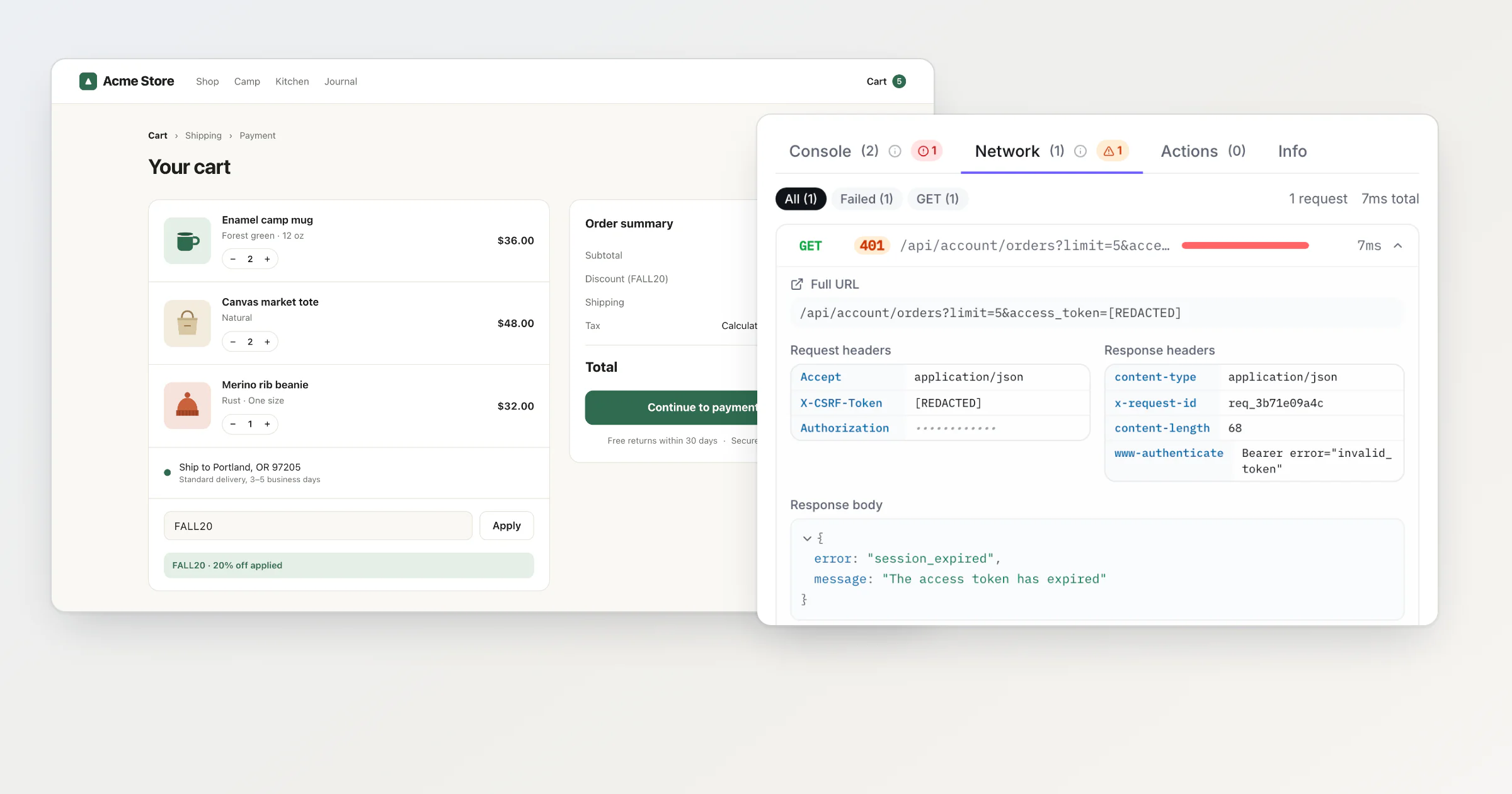
A HAR request sends the customer through the five steps above, in a browser panel they may never have opened, and then asks them to send you a file that holds their session. I built BugDump's widget to send the page's requests with the bug report, so the customer never opens the developer tools. From the moment its script starts, the widget records the requests your page makes with fetch and XMLHttpRequest: method, URL, status, timing, the request headers your code passes to fetch (none for XMLHttpRequest), the response headers, and the bodies if you turn on captureNetworkBodies.
Here is what that looks like for a request that carries secrets. On the demo shop I use for screenshots, the shop's code asked for a customer's recent orders with a token in the URL, an Authorization header and a CSRF token, and the API answered 401 session_expired. The customer, Daniel, is made up, and a script played him through the real widget. He wrote: "Tried to open my last order from the cart and it says my session expired. I signed in five minutes ago."
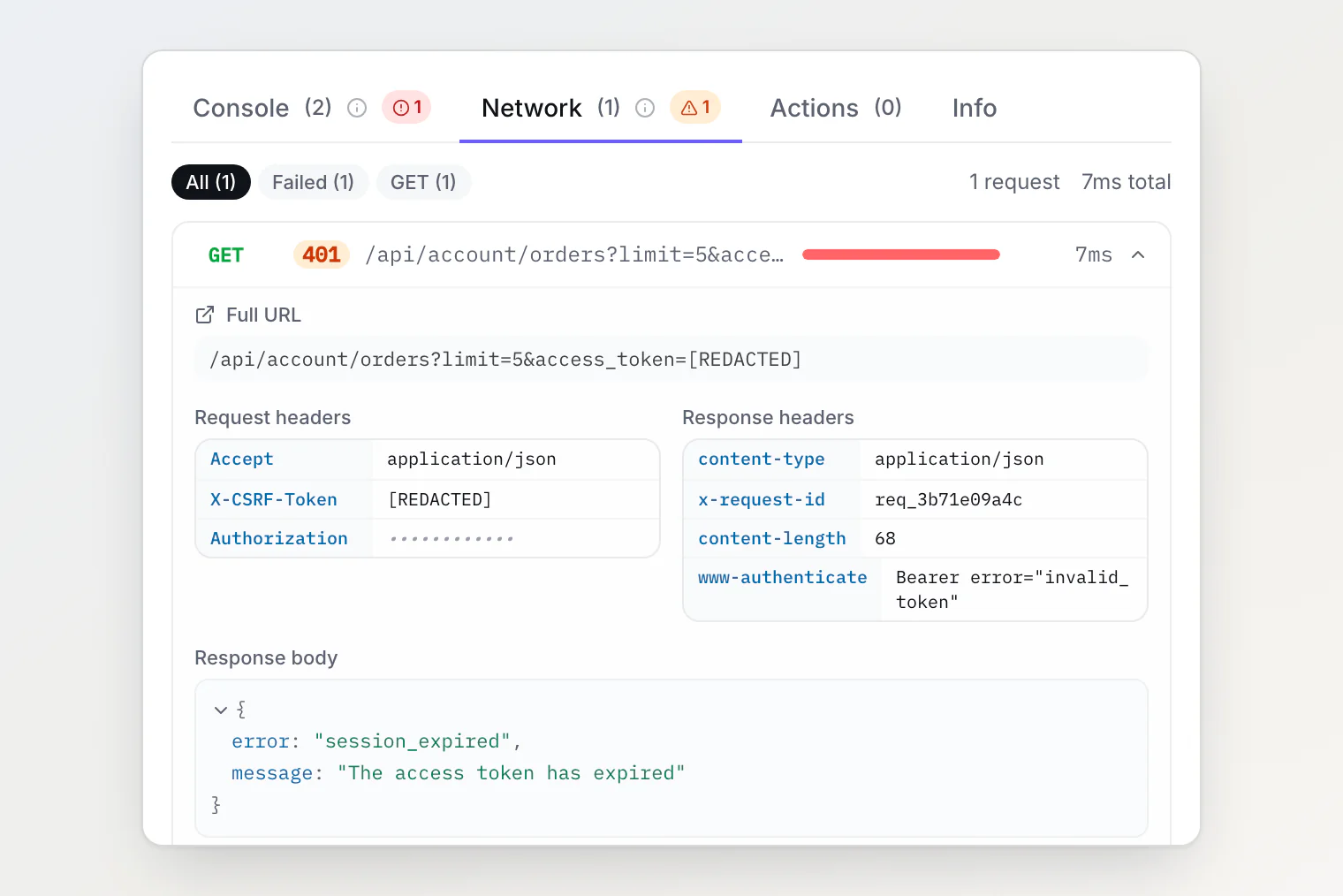
The report keeps what the developer needs: the 401, session_expired, and the www-authenticate header that says the token was invalid. The secrets didn't reach it:
Before a report is stored, the server replaces with
[REDACTED]the values of headers, URL parameters and JSON or form fields whose names contain words such astoken,secret,password,session,api_key,jwtorcsrf. TheAuthorizationvalue is stored as[REDACTED]too, and the app shows it as dots.Cookies never get there. A page's scripts can't read the
Cookieheader the browser adds, or aSet-Cookieresponse header, so the widget never sees them.Request and response bodies stay out unless you turn them on. This shop turns them on, so the 401 arrived with its body.
When you still need the HAR
The widget sees what the page's own scripts see. Ask for a HAR when the problem is in what they can't:
requests made before the widget's script started, such as the first API calls on page load;
the HTML document, scripts, styles, images and fonts: the report carries the URL, duration and size of the last 20 of them, but no status, headers or bodies;
a CORS failure: the page gets only a network error, while the HAR shows the preflight
OPTIONSrequest and the response headers the browser rejected;each hop of a redirect, whether the browser answered from its own cache, and the headers of the document and static files;
WebSocket traffic;
a long session: the widget keeps the last 150 requests, or 1,000 while the reporter records the screen, and the first 32,768 characters of each body.
Questions about HAR files
Is it safe to send a HAR file? Only to someone you would trust with your session, and only after you remove cookies and tokens. Signing out also helps, if the site ends its sessions on the server.
How do I open a HAR file? In Chrome and Edge, drag it onto the list of requests in the Network panel or click Import HAR. In Firefox, choose Import HAR in the gear menu. In Safari, click Import in the Network tab. It's JSON, so any text editor opens it too.
Why is my HAR file empty? The developer tools record only while they're open. Open them first, then reload the page and repeat the steps.
Continue reading
See the Console Errors Your Users See — No DevTools Required: the same idea for the console, from the user's browser to your report.
How to capture console logs and network requests from a user's browser: how to wrap
fetchandXMLHttpRequestwithout breaking the page you watch.Session replay without the surveillance: what BugDump records, what it leaves out, and how to switch each part off.