Every issue tracker eventually grows custom fields, and every team that gets them goes through the same arc: a burst of enthusiasm, eleven new fields, and six weeks later a form where nine of them are empty on every ticket.
The problem is not custom fields. It is that "would this be useful to know?" is the wrong question to ask before creating one. Almost anything would be useful to know.
The test worth applying
Before adding a field, ask: what decision changes because of it?
Not "what would this tell us" — what would you do differently. If the honest answer is "we would be able to see it," that is a field that will be empty in a month, because nobody fills in a box that changes nothing.
Two examples of the same information passing and failing the test:
Affected version, on a team that ships weekly and supports two releases: passes. It decides whether a bug needs a backport.
Affected version, on a continuously deployed web app: fails. Everyone is on the same version. It is a box that records the date in a worse format.
The field is identical. The decision is not.
The second test: who fills it in?
A field filled by whoever triages is realistic. A field that requires information only the reporter has, or only an engineer has after investigating, gets skipped during triage and never revisited.
If a field can only be answered late, it is not a triage field, and putting it next to priority means it will drag every triage pass down while staying empty.
Fields that reliably pay for themselves
Customer tier (select). If a bug's urgency genuinely depends on who hit it, this is the one field that changes triage order most. It passes the decision test cleanly.
Regression? (checkbox). One bit, filled during triage, and it splits the backlog into "we broke this" and "this was never right". Those are two different queues with two different urgencies.
Linked PR (URL). Not for tracking — for the person who reopens the bug in four months and wants to know what was already tried.
Reviewer or QA owner (member). Only if a second person genuinely has to sign off. If "assignee" is the only role that exists on your team, this is a field that will always equal the assignee.
Fields to resist
Anything derivable. Days open, report count, has attachments — the tracker already knows, and a hand-maintained copy will go stale the first time somebody forgets.
A second status. Blocked, Needs info, Waiting on customer as a field alongside the board column means the task's real state lives in two places that will disagree. If it is a state, it is a column — and if you do not want a column for it, you probably do not want the state either.
Free text where a select belongs. A text field called Component will accumulate checkout, Checkout, check-out and chkout, and then it cannot be filtered or counted. If you want to group by it, it has to be a fixed list.
Anything you are adding because one person asked once. Fields are cheap to create and socially expensive to remove. The bar should be higher than "someone mentioned it."
Typing the field correctly
Types are not decoration. They decide what you can ask the board later.
Type | Use it when | Lets you |
|---|---|---|
Select | A fixed set of choices | Filter and group cleanly |
Multi-select | Several from a fixed set | Ask "affects iOS or Android" |
Number | A real quantity | Filter by a range |
Date | A point in time | Filter by a range |
Checkbox | One bit | Split the board in two |
Text / URL | Anything else | Substring search only |
The main mistake is reaching for text because it is fastest to set up. Text is the type you pick when you have accepted that you will never filter on the field.
In BugDump a property's type cannot be changed after creation, because the values already stored have that type's shape — so the thirty seconds spent choosing is worth it.
Fewer fields, filled in
The thing that makes a board useful is not how much it can record. It is that what it records is trustworthy.
Three fields that are populated on every task beat eleven where each is populated on a third. A sparse field is worse than no field: it looks like data, so people filter on it, and the filter silently excludes every task where somebody was in a hurry.
A practical habit: after a month, look at how often each custom field is set. Anything under about half is either badly named, badly placed, or answering a question nobody has. Delete it. In BugDump, deleting a property removes it and its values but leaves the tasks untouched, so pruning costs nothing but the decision.
How it works in BugDump
Custom properties live on the project's Properties page, alongside the five built-ins — status, assignee, priority, labels and due date — which are built on the same mechanism and editable in the same way.
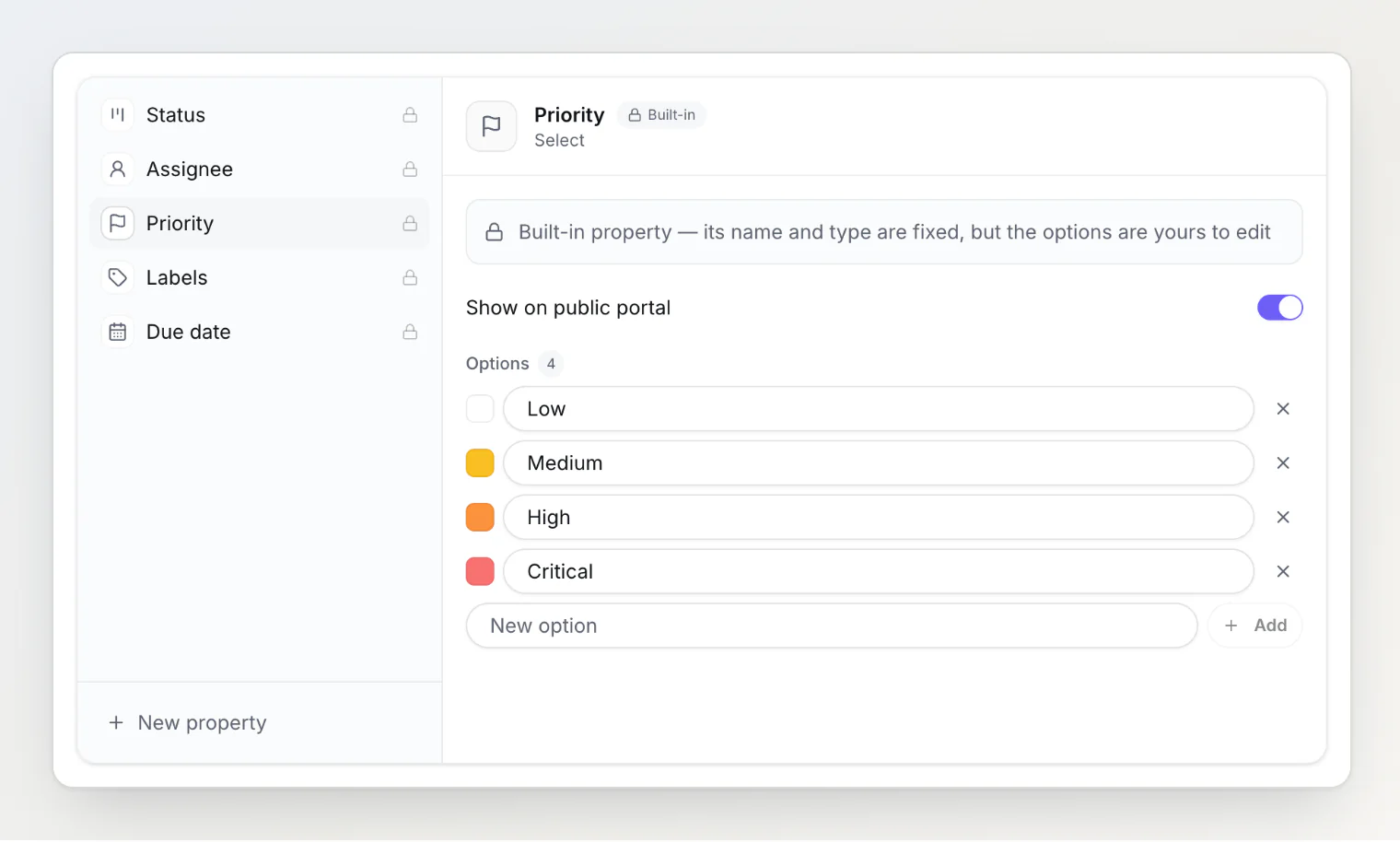
There are eight types — text, number, date, checkbox, URL, select, multi-select and member — and each gets a filter control on the board that suits it: checkboxes for selects, a range for numbers and dates, a contains box for text. Filters combine with AND and live in the URL, so a filtered board is a link.
They also reach your AI agent. The MCP server returns every property with its options, and list_tasks takes property filters, so "open tasks where Customer tier is Enterprise" is a single call rather than a fetch-everything-and-scan.
Custom properties are on Pro and Ultra; the five built-ins, including the editable priority list, are on every plan.
Read next: Bug Priority Levels: Why Four Fixed Choices Never Fit and Bug Tracking Metrics That Actually Matter.